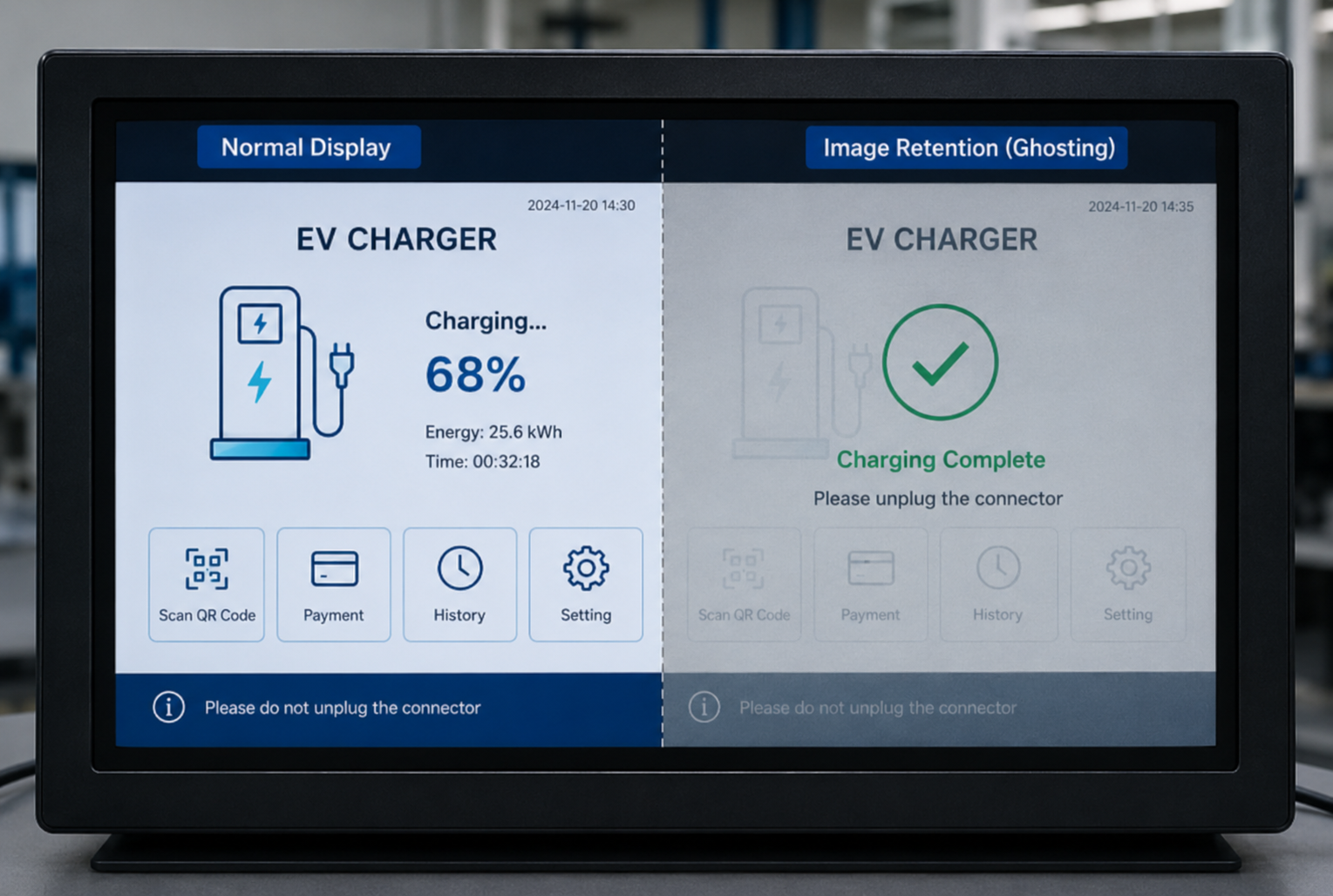
Industrial HMIs and embedded products often run the same UI for hours: fixed menus, status bars, icons, and button grids. When users report a faint “ghost” of that UI lingering after a screen change, it’s usually not a firmware bug—and it’s not the same as motion blur.
This guide explains what image retention is in TFT LCDs, why it happens, where the risk is highest in industrial products, and how to design and test to reduce it before mass production.
What Is Image Retention in a TFT LCD Display?
Basic definition of image retention
Image retention (also called image persistence or image sticking) is a temporary afterimage: content that was displayed for a long time leaves a faint residual pattern that remains visible after the content changes.
In TFT LCDs, it’s commonly associated with residual electrical effects in the liquid crystal cell—often described as residual charge or residual DC voltage—so some pixels don’t immediately return to a fully neutral optical state.
Why it appears as a faint ghost image on the screen
A TFT LCD pixel’s optical state is controlled by an electric field. After long static display, the pixel region can develop a “memory” of that field history.
In liquid crystal research, one mechanism tied to “image sticking” is residual direct current (DC) voltage related to ionic effects and material interfaces, which can leave a small unintended internal field even after the drive conditions change (see the AIP Journal of Applied Physics paper on residual direct current voltage in LC cells (2007)).
To an end user, that history shows up as a low-contrast “shadow” of previous high-contrast UI areas—most noticeable on uniform backgrounds like mid-gray.
Key Takeaway: In industrial TFT LCDs, image retention is usually about electrical history and recovery time, not a “burned” display. Qualify it like a reliability behavior: induce → observe → measure recovery.
Image retention vs motion ghosting: not the same issue
Image retention is a static afterimage that remains when the content changes.
Motion ghosting (motion blur / trailing) is a dynamic artifact you see during movement—often tied to response time, overdrive tuning, refresh rate, or sample-and-hold behavior.
If the complaint is “moving objects smear,” treat it as a motion-performance topic. If the complaint is “the old menu is still faintly visible after I switch pages,” treat it as image retention.
Common terms: image retention, image persistence, image sticking, ghost image, and burn-in
In the field, you’ll hear all of these:
Image retention / image persistence / image sticking: typically used for LCD afterimages that are expected to be reversible.
Ghost image: an informal description of the visible symptom.
Burn-in: often used loosely, but in engineering discussions it should be reserved for permanent damage mechanisms.
The terminology matters because it changes how teams interpret risk, acceptance criteria, and warranty exposure.
Image Retention vs Burn-In: What Is the Difference?
Temporary image retention in LCD displays
In LCDs, image retention is generally treated as a temporary phenomenon. In other words, in the “LCD image retention vs burn-in” debate, retention is the reversible afterimage you qualify with recovery time. Support guidance from MicroTouch explicitly distinguishes LCD “image persistence/retention” from permanent burn-in and notes that the effect can dissipate over time; it also suggests exercising the display with alternating white/black patterns to accelerate recovery.
Permanent burn-in and uneven pixel aging
“Burn-in” implies irreversible change—historically associated with emissive display wear (for example, phosphor aging in CRTs), or uneven aging mechanisms where some areas can no longer match the rest of the screen.
LCD image retention vs OLED burn-in behavior
TFT LCD: modulates a backlight; image retention is commonly discussed as a temporary, electrically influenced “memory” effect.
OLED: is emissive; true burn-in risk is often framed around uneven aging of organic emitters when the same high-brightness elements are shown for long periods.
This is one reason many 24/7 industrial UIs still favor LCD technology when the interface has large static regions.
Why this distinction matters for reliability analysis and supplier communication
If your team calls everything “burn-in,” you can end up with:
unclear acceptance criteria (what recovery time is acceptable?)
mismatched test plans (are you testing reversibility or permanent degradation?)
poor supplier conversations (they can’t respond accurately if the symptom isn’t defined)
Using “image retention” for reversible LCD afterimages allows you to specify:
the inducing pattern and exposure time
the observation method
the recovery conditions and required recovery time
What Causes Image Retention in TFT LCD Displays?
Residual charge, DC bias, and liquid crystal behavior
At a high level, image retention can be thought of as electrical history inside the LC cell.
Liquid crystal displays are designed to avoid net DC stress over time, but under some conditions (materials, drive waveforms, static patterns, environmental stress), small imbalances can contribute to residual fields.
Peer-reviewed LC literature discusses residual DC voltage generation mechanisms and evaluation parameters related to “image sticking” behavior.
Static pixels, fixed icons, and high-contrast UI areas
Risk rises when the same regions repeatedly show:
fixed button frames
high-contrast icons
status bars that never move
large black/white boundaries
Because those regions experience the same drive history for long intervals, any residual effect becomes spatially “patterned,” which is exactly what you observe as a ghost image.
High brightness, long uptime, and repeated display patterns
In industrial products, brightness and uptime are often higher than consumer use:
24/7 operation
daylight-readable modes
repeated application screens (same layout every day)
Higher brightness doesn’t automatically “cause” retention (LCD brightness is backlight-driven), but higher brightness settings often correlate with thermal load and operating stress, and they tend to make artifacts more noticeable to users.
Temperature, enclosure design, and real operating conditions
Field failures often show up because real installations are not “lab ambient.” Enclosures can:
trap heat behind the panel
create temperature gradients
drive the display closer to its upper operating range
Vendor guidance commonly warns that environmental conditions (especially heat) and static usage patterns can worsen retention risk and visibility (see Elo Touch methods to prevent LCD image retention (2025)).
Why field conditions may differ from normal lab use
A lab demo might:
run at moderate brightness
operate intermittently
sit in open air
A deployed industrial unit might:
run at high brightness continuously
show a fixed HMI screen for entire shifts
operate in a sealed or semi-sealed enclosure
So the right question isn’t “does the panel retain at room temp,” but “what does retention look like under our duty cycle, brightness, and thermal reality?”
Which Industrial Applications Have Higher Image Retention Risk?
Industrial HMI control panels with fixed buttons and menus
Classic high-risk scenario: a control panel with a fixed layout (button grid + alarms + status bar) displayed all day.
If you’re building an HMI device, it’s worth reviewing how often UI elements truly change—and whether you can rotate or shift static elements.
Medical devices and test instruments with static interface areas
Many medical and lab instruments show stable readouts and fixed controls. Even if the whole screen updates occasionally, the surrounding UI chrome may remain static for long periods.
Energy monitoring terminals and information display systems
Energy dashboards often have persistent chart frames, fixed legends, and static headers that remain constant across screens.
Kiosks, POS terminals, and unattended 24/7 devices
Unattended devices are vulnerable because they get “stuck” on the same screen.
For industrial automation and embedded deployments, this overlaps with kiosk-like uptime patterns (see LMTEK industrial automation display & HMI solutions for typical industrial HMI deployment contexts).
Outdoor or high-brightness devices with long static display time
Outdoor readability typically means higher backlight power and more thermal load. Combine that with static content and long uptime, and you have a practical retention risk scenario.
How to Prevent Image Retention During Product Design
Use dynamic UI design instead of fixed high-contrast elements
The most reliable prevention is to avoid giving the panel the same static high-contrast pattern for hours.
Practical UI tactics:
reduce contrast in persistent UI chrome (when usability allows)
avoid thin, high-contrast borders that never move
rotate or slightly shift persistent elements (logos, headers)
Add screen savers, pixel shift, dimming, or sleep modes
If the device is idle or semi-idle, build in a display-care routine:
screen saver with motion
periodic blanking
timed sleep mode
pixel shift (if supported)
Control brightness based on real working conditions
Engineering-friendly rule: don’t run brighter than you need.
If the product supports ambient light sensing, map brightness to actual conditions. If it doesn’t, choose conservative default brightness settings and allow service configuration.
If you’re selecting modules for a product, the display’s brightness and integration constraints are often tied to the module and backlight design (see LMTEK TFT display modules for typical industrial module ranges and integration considerations).
Consider thermal design, enclosure layout, and duty cycle
Treat retention risk like a system problem:
where is backlight heat going?
what’s the panel temperature at steady state?
do you have airflow paths or conductive heat spreading?
how long does the UI stay static in a typical shift?
Review display usage early in OEM / ODM development
Retention surprises late in the program are expensive because fixes often require:
UI redesign
firmware updates for screen-care routines
thermal/mechanical revisions
panel selection changes
If you’re doing custom integration, it helps to align display behavior with the full product design early (see LMTEK custom TFT display integration support).
What to Do If Image Retention Already Appears
Let the display rest or switch to varied moving content
For LCD retention, the first response is usually simple:
stop showing the inducing static image
show varied content
allow time for the afterimage to fade
Use refresh patterns or screen-care routines where applicable
Support guidance often recommends “exercise” patterns:
alternating full white/full black screens
full-color cycling
One example notes that alternating white and black screens can help speed dissipation.
Reduce brightness and avoid repeating the same static image
If the unit is already showing retention, reduce the stress:
lower brightness where usability allows
avoid repeating the same static pattern for long intervals
Check whether the issue recovers within the expected time
Define “expected” for your product:
minutes to hours for mild cases
longer for severe cases
What matters is not a universal number, but whether your specific panel recovers consistently within your acceptance criteria.
When image retention may require supplier evaluation
Escalate when:
retention becomes progressively worse under the same usage
recovery time increases dramatically
the artifact remains visible after extended recovery attempts
different panels behave inconsistently in the same build
At that point, you need structured reproduction conditions to share with the panel supplier.
How to Test Image Retention Before Mass Production
Define test conditions: image pattern, brightness, time, and temperature
Before you test, define the basics:
inducing pattern (high-contrast test pattern or real UI)
brightness setting(s)
exposure time(s)
temperature condition(s)
If you don’t control these, results won’t be comparable.
Use realistic static UI patterns from the final application
A chessboard pattern is useful for stress, but it’s not your product.
Your UI likely has:
a fixed menu bar
a button grid
numeric readouts
persistent icons
Those are the patterns you should qualify.
Run static image stress tests under real duty cycles
A practical approach is:
run your most static screen for the same duration it will be shown in the field
repeat across expected use cycles
include your worst-case brightness mode and thermal condition
Measure recovery time after switching to neutral or dynamic images
A common evaluation pattern is:
display a static high-contrast pattern
switch to a uniform gray field
record whether the ghost is visible and how long until it is no longer visible
A technical reference describes a chessboard exposure followed by 50% gray evaluation (see Tech Briefs’ image sticking test method (2021)).
For measurement cadence and documentation, a consumer-monitor methodology is also useful as inspiration (static exposure, then gray-field capture and timed recovery observation; see RTINGS image retention test methodology (2026)).
Set acceptance criteria for visibility, recovery, and operating limits
For OEM qualification, define acceptance criteria that procurement and suppliers can use:
visibility threshold (how visible is “too visible”?)
max recovery time at specified conditions
max allowed static display duration (if you plan a screen-care routine)
required mitigation features (pixel shift, sleep mode) for certain SKUs
Document test results for engineering, quality, and purchasing review
Your documentation should include:
the inducing pattern (screenshots)
test brightness and backlight settings
panel temperature (not just ambient)
exposure duration
recovery method (gray field, cycling, power-off)
recovery time results across samples
This makes supplier conversations actionable instead of subjective.
How to Choose a Display for 24/7 Industrial Use
Compare TFT LCD, OLED, and other display options carefully
If your UI is static-heavy and runs 24/7, retention/burn-in behavior is a selection criterion.
LCD and OLED fail differently under static content. Your choice should be driven by:
how static the UI really is
allowable mitigations (pixel shift, screen saver, dimming)
brightness and thermal constraints
lifetime and uniformity expectations
Match display technology to UI behavior and operating hours
Two quick heuristics:
Static UI + 24/7 + high brightness → plan for LCD retention mitigation, and test it.
Highly dynamic UI + strong color/contrast requirement → OLED may fit, but evaluate burn-in risk.
Ask suppliers about static content, brightness, and thermal limits
Supplier questions that reduce surprises:
What inversion/drive considerations apply for long static images?
Do you have retention test data at elevated temperature?
What’s the expected recovery behavior after defined static exposure?
Are there recommended UI or firmware mitigations for this panel family?
Evaluate customization needs for touch screen, cover lens, HMI, or enclosure design
Retention is influenced by the full product environment.
When you specify touch bonding, cover lens, and enclosure design, also specify:
worst-case brightness
ambient and panel temperature targets
duty cycle (how long screens remain static)
Choose a display solution based on the full application environment
Treat display selection as a system-level decision, not just a diagonal size and interface choice.
If you’re evaluating industrial modules, start with a vendor that can support the full integration context and validation workflow.
How LMTEK Helps Reduce Image Retention Risk in Custom Display Projects
Reviewing UI behavior, brightness, temperature, and duty cycle
Reducing image retention risk is usually about aligning panel capability with real usage:
UI static time and contrast patterns
brightness targets vs environment
thermal conditions inside the enclosure
expected uptime and screen-care routines
Supporting TFT LCD, touch screen, bonding, and HMI customization
LMTEK supports TFT LCD modules and touch integration paths that affect real-world display behavior, including customization and integration planning (see LMTEK custom solutions).
Helping customers validate display performance before mass production
Before you lock a display into a long-lifecycle OEM program, validating retention behavior under realistic conditions can prevent costly late-stage changes.
Discuss your project requirements with LMTEK before final selection
If you’re designing a 24/7 or static-heavy HMI and want to de-risk image retention early, you can share your UI patterns, brightness targets, enclosure constraints, and duty cycle with LMTEK’s team: Contact LMTEK.
Frequently Asked Questions About Image Retention
Is image retention on LCD permanent?
Usually no. In LCDs, image retention is generally discussed as a temporary afterimage that fades with time and use, unlike permanent burn-in mechanisms.
Can image retention recover by itself?
Often yes. Many cases fade after switching to varied content or leaving the display to relax. Some guidance notes it can take hours—and in stubborn cases, longer—depending on conditions and how long the static image was displayed.
Does high brightness increase image retention risk?
High brightness can correlate with higher thermal and operating stress, and it can make artifacts more noticeable. Practically: run at the lowest brightness that still meets readability requirements, especially for long static displays.
Is OLED more likely to suffer burn-in than LCD?
OLED is often associated with true burn-in risk from uneven emitter aging under static bright elements. LCDs more commonly show temporary retention behavior. Which is “more likely” depends on your UI (static vs dynamic), brightness, and duty cycle.
How can I reduce image retention risk in a 24/7 industrial device?
Design for it early:
avoid long static high-contrast UI regions
implement screen-care routines (sleep, screen saver, pixel shift)
validate under real brightness and thermal conditions
set acceptance criteria and document recovery behavior