Introduction
Disclosure: LMTEK provides LCD display modules and related integration services; product examples are included for evaluation convenience.
Choosing between LCD vs OLED isn’t a consumer-spec debate. For embedded products, HMIs, and long-lifecycle equipment, it’s a risk decision: readability in the real environment, predictable brightness under real UI content, long-term availability, and how painful bring-up will be when the first prototype hits the bench.
This guide is written for engineers, embedded developers, PMs, and technical buyers who have to ship and support hardware, not just demo it.
You’ll learn how to evaluate LCD and OLED with the criteria that actually drive project outcomes:
- Environment: sunlight, glare, temperature, moisture, vibration.
- UI style: mostly static vs highly dynamic; dark vs light themes.
- Duty cycle: always-on vs intermittent.
- Interfaces: SPI/RGB/LVDS/eDP/MIPI DSI, and what’s realistic for your SoC.
- Cost and supply: BOM, NRE, lead time, and EOL risk.
By the end, you’ll have decision patterns, scenario picks, and test tips you can use to validate a display choice without betting the schedule on vendor-specific assumptions.
Visual performance (LCD vs OLED)
Contrast and blacks
OLED’s biggest win is simple: pixels emit their own light. When a pixel is off, it’s off, so blacks are deep and contrast is excellent.
LCD is backlit. Even with good optical stacks and local dimming approaches, you’re managing leakage and haze, not eliminating it.
For many industrial UIs, contrast is not the constraint. Readability is. If your UI is mostly flat colors, icons, and text, the optical stack, cover lens, and ambient reflections often matter more than the theoretical black level.
Response and motion
OLED response times are typically very fast, which helps with motion clarity, animated transitions, and video.
LCD response depends on panel mode and driving (TN/IPS/VA variants, overdrive tuning, temperature). In embedded projects, you usually feel this difference only if:
- you’re animating large areas,
- you have fast scrolling content,
- or you’re rendering video at meaningful frame rates.
If your application is a mostly static dashboard (common for industrial control), response time usually isn’t the deciding factor.
Viewing angles and color
OLED generally holds color and contrast well across viewing angles. That helps when operators view screens from off-axis positions.
LCD can be excellent here too, especially with IPS-type panels, but results vary by panel technology and optical bonding/cover lens choices. For industrial gear, don’t treat “IPS” as a guarantee. Treat viewing angle as a requirement you validate with the actual module + your actual cover glass.
Brightness and readability
Outdoor readability
Outdoor readability is where LCD often wins in practice.
Two reasons:
- You can build LCD modules for sustained high luminance using a dedicated backlight system.
- Transflective or high-brightness LCD configurations can be designed specifically for high ambient environments.
OLED can look stunning in controlled indoor light. Outdoors, the combination of reflections, large bright UI regions, and sustained brightness limits can make an OLED panel look less “confident” than expected.
If your product must be legible in sun, prioritize evaluating LCD modules built for brightness, including options like high-brightness backlights (for example, LMTEK TFT LCD display modules include high-brightness series intended for harsh environments).
PWM and eye comfort
Both LCD and OLED products may use PWM (pulse-width modulation) for brightness control, depending on driver and backlight/panel design. PWM is not automatically a deal-breaker, but it does change how a screen feels during long sessions.
Practical evaluation tips:
- Ask whether brightness control uses PWM, DC dimming, or a hybrid approach.
- Test at the brightness levels your operators will actually use (not just max brightness).
- Include your cover lens and final ambient lighting in the evaluation; flicker perception can change with reflections and glare.
Thermal and ABL behavior
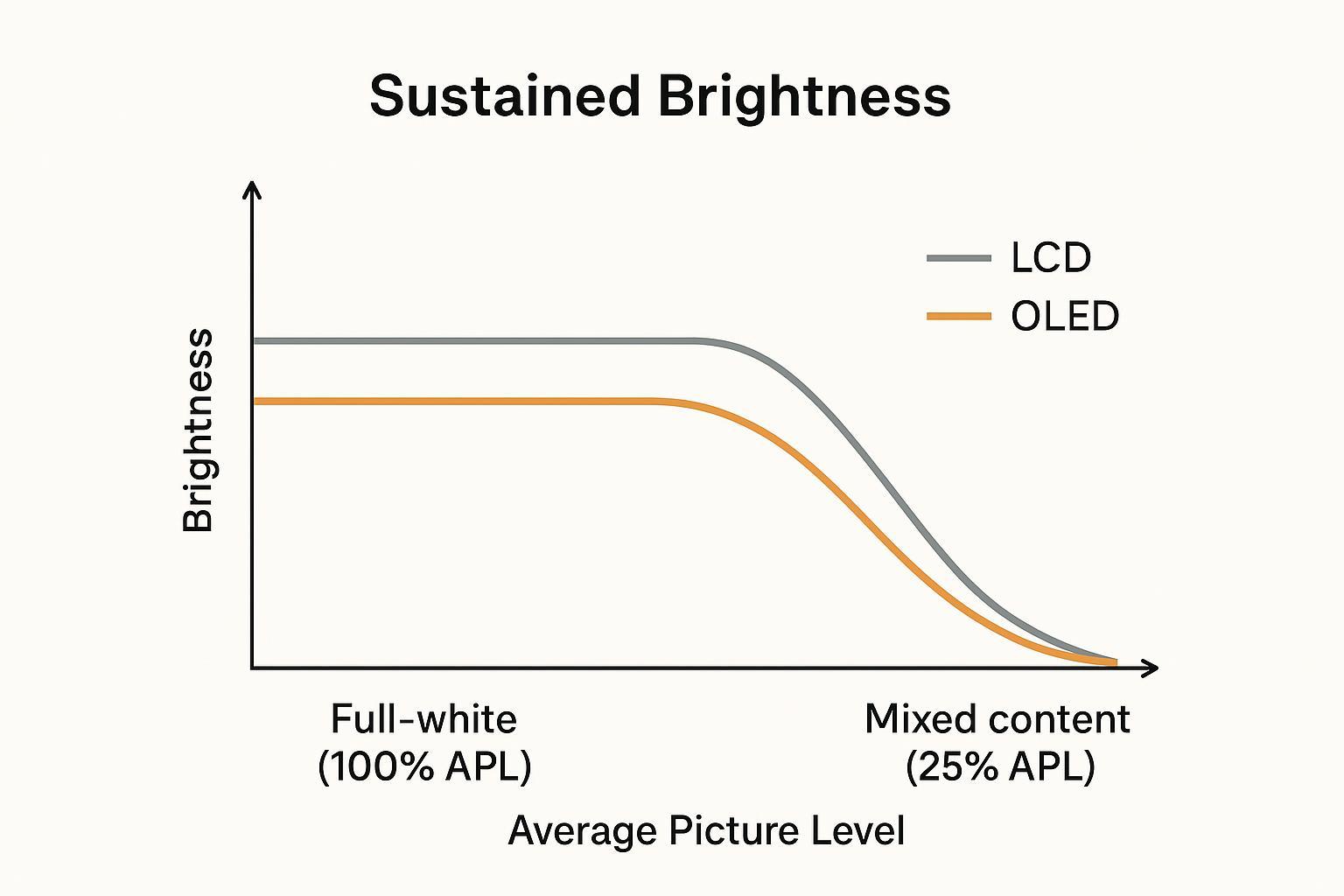
OLED has a system behavior that catches teams off guard: ABL (automatic brightness limiter). In plain terms, OLED can deliver very bright highlights in small areas, but it often can’t sustain the same brightness when large portions of the screen are bright.
That’s not marketing spin. It’s power and thermal management.
A good engineering way to think about it is APL (average picture level): the higher the APL (more of the screen is bright), the more likely ABL reduces luminance.
For embedded products, this matters when your UI includes:
- large white/gray backgrounds,
- full-screen maps and tables,
- big status panels,
- or any “safety UI” that must remain legible at a fixed perceived brightness.
Power, burn-in, lifespan
Content-dependent power
LCD power is dominated by the backlight and tends to be more predictable across content (especially if you hold brightness constant).
OLED power is strongly content-dependent:
- dark UI themes can be efficient,
- bright UIs can consume more power,
- and at high APL the panel may reduce brightness (ABL) to stay inside limits.
If you’re power-budgeting an always-on device, don’t use a single “typical” number from a datasheet. Measure dark and light UI variants.
Burn-in risk and mitigations
OLED’s core lifecycle risk for many industrial HMIs is uneven pixel aging. Static elements (status bars, fixed icons, constant readouts) can age certain regions faster, which is why teams worry about OLED burn-in in always-on or semi-static interfaces.
Mitigations exist, but they’re part of the design work:
- pixel shifting / subtle image movement,
- logo/static-element dimming,
- screen savers and timeouts,
- UI design that avoids permanent high-contrast fixed shapes.
Consumer OLED guidance covers this in accessible terms. For example, LG describes built-in protections such as logo luminance adjustment and refresh cycles in its OLED reliability guidance (“OLED TV Reliability: Burn-In & Lifespan — Get the Facts”).
For industrial projects, the takeaway is straightforward:
⚠️ Warning: If your UI is intentionally static (classic HMI dashboards), LCD typically reduces lifecycle risk because it eliminates burn-in as a failure mode.
Lifetime and duty cycle
Duty cycle drives everything.
- If the display is on a few hours a day with a dynamic UI, OLED risk is easier to manage.
- If it’s 24/7 always-on with persistent graphics, you need a burn-in plan and evidence that it holds up under your expected luminance and temperature.
For long lifecycle programs, also ask for:
- availability commitments (or second-source strategy),
- substitute part guidance,
- and what happens when the panel is discontinued.
Interfaces and prototyping
Interface selection
Interface choice is often where “LCD vs OLED” stops being theoretical and becomes project reality.
In embedded systems, display interface constraints are usually driven by your SoC, your pixel clock budget, EMI, cable length, and how much driver work you can afford.
You’re typically balancing:
- what your SoC supports natively (e.g., RGB, LVDS, MIPI DSI, eDP),
- required resolution and refresh,
- cable length/EMI constraints,
- and driver maturity.
A practical approach is to treat the interface as an acceptance test, not a vendor promise:
- define the target timing and pixel format,
- validate signal integrity early,
- and confirm the software path (bootloader splash, kernel driver, GUI stack).
Prototyping paths
For consideration-stage evaluation, speed matters, but lock-in is expensive.
A good prototyping workflow is:
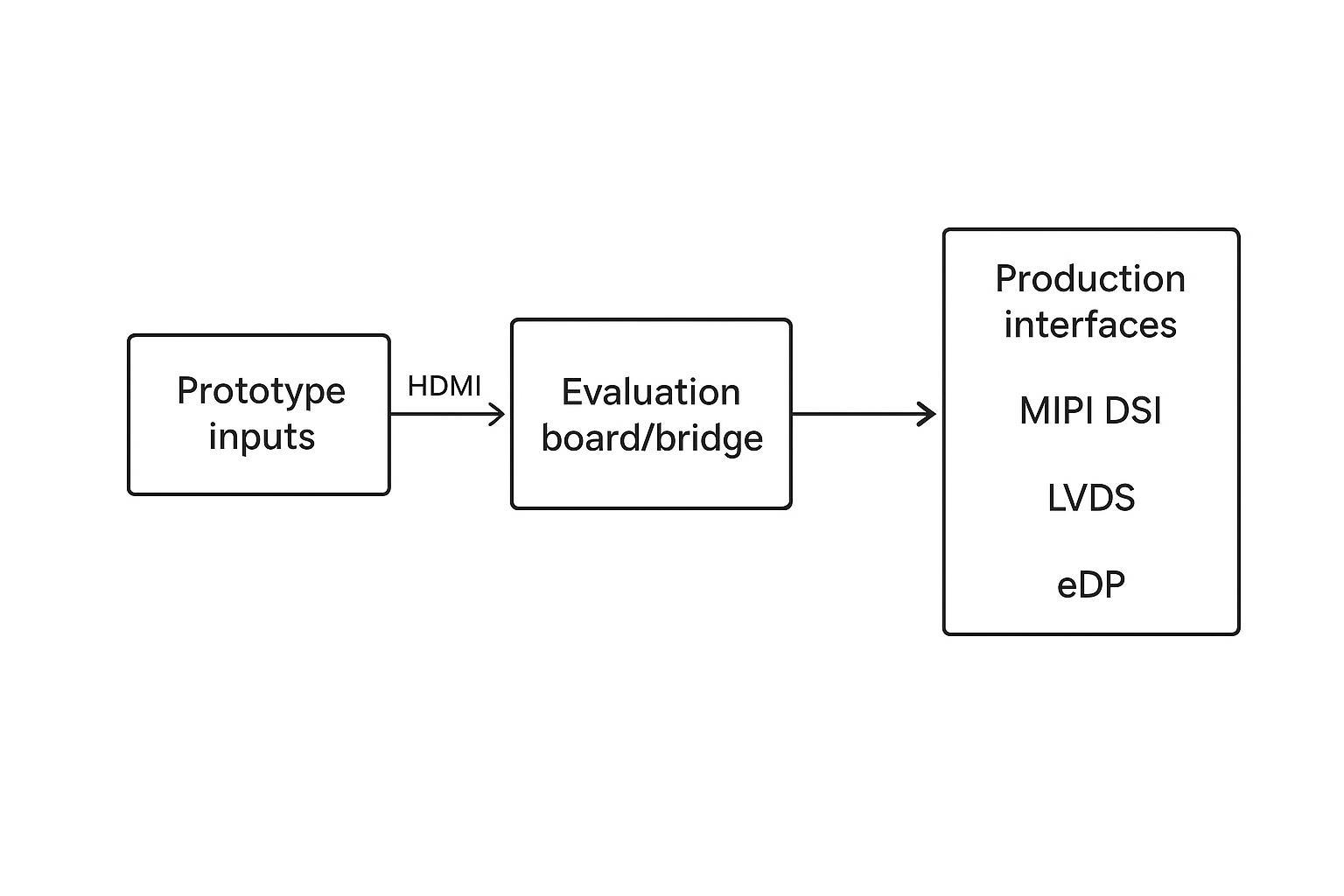
- start with interfaces that are easy to bring up on the bench (often HDMI or SPI-based evaluation paths),
- validate UI readability and touch behavior in the real environment,
- then move to the production interface that matches your final mechanical and EMC constraints.
When teams want help validating LCD-based requirements without committing to a single panel vendor too early, a partner model can work well.
For example, My Brand (LMTEK) can act as an embedded display module and project evaluation partner: helping engineering teams validate brightness targets, touch integration, mechanical stack-up, and interface feasibility while keeping the evaluation criteria portable. The point is to keep your requirements and test results reusable even if you later switch panel models or suppliers.
If you’re doing touch integration, it’s also worth validating bonding approach, cover glass thickness, and glove/wet use early, since those change both optics and responsiveness. Pages like LMTEK custom TFT display options summarize typical variables (interfaces, brightness targets, touch type, bonding) that should be treated as testable requirements.
Supply and availability
Industrial OEM programs fail in slow motion when the display goes EOL mid-lifecycle.
For both LCD and OLED modules, treat supply as a design input:
- lead time variability,
- minimum order quantities,
- approved vendor list (AVL) qualification effort,
- substitute part strategy,
- and whether the vendor can provide a backward-compatible successor.
Use-case decisions
Always-on industrial/outdoor
If you’re building an always-on industrial or outdoor system, LCD is usually the conservative pick.
Why:
- predictable sustained brightness for safety-critical readability,
- no burn-in risk from static dashboards,
- broad availability of ruggedized modules designed for harsh environments.
This is also the context where “system-level” decisions matter: enclosure sealing, cover lens coatings, thermal paths, and the full optical stack. If your product is an HMI panel or gateway with continuous uptime requirements, it’s worth looking at reference architectures like LMTEK industrial HMI solutions to sanity-check what ruggedness features and certifications are commonly expected.
Wearables and premium UIs
If the product is compact, battery powered, and the UI is visually rich (animations, deep blacks, high perceived contrast), OLED can be a strong choice.
OLED tends to shine when:
- the UI uses darker themes,
- content changes frequently,
- and the environment is mostly indoors or controlled light.
You still need an ABL-aware design review: the UI should be tested in worst-case bright screens, and you should verify the user experience doesn’t “dim out” unexpectedly under high APL content.
Decision checklist
Use this checklist to get to a decision without overfitting to marketing specs:
- Environment: Will the screen be used in direct sun or high-glare factory lighting?
- UI behavior: Are there fixed elements that stay in the same place for hours?
- Brightness requirement: Do you need sustained brightness, or only small bright highlights?
- Thermals: What happens after a 2–4 hour thermal soak at max backlight / max APL?
- Power: Compare power on your real dark UI vs your real light UI.
- Interfaces: Can your SoC drive the panel natively (or do you need bridges)?
- Supply: What’s the EOL plan and second-source strategy for a 5–10 year program?
Conclusion
Bench validation notes
If you want this decision to survive real-world use (not just a spec-sheet comparison), run a quick, repeatable bench check on candidate modules:
- Sustained brightness: After a 2–4 hour thermal soak at your intended enclosure temperature, measure luminance at 100% white and on your real UI screens (a simple colorimeter/lux meter setup is better than guessing).
- OLED ABL awareness: Test multiple window sizes (10%, 50%, 100% white) and record whether brightness steps down over time.
- Readability: Evaluate with your actual cover lens/coating and the worst ambient lighting you expect (sun, factory LEDs, glare angles).
- Power: Measure current draw on your real dark theme and light theme; don’t rely on one “typical” datasheet number.
- Interface bring-up: Validate boot splash → OS driver → GUI stack early, using your target pixel format/timings and realistic cable lengths.
LCD vs OLED is not a single winner decision.
- LCD wins for outdoor readability, static and always-on UIs, and long-lifecycle industrial deployments.
- OLED wins for contrast, true blacks, and premium dynamic UIs.
Match your content style and duty cycle to power, lifetime, and burn-in risk. Then validate with real devices:
- measure sustained brightness (not just peak),
- characterize ABL behavior across window size/APL,
- and compare power on dark vs light UI.
If your project needs LCD evaluation, touch integration, or interface validation without locking into a single panel too early, Contact LMTEK to review requirements against the real environment, interface constraints, and production feasibility.