LCD Screen Bleed and Backlight Bleed: Causes, Testing, Fixes, and OEM Prevention
When developing a smart home hub, medical interface, industrial control panel, or embedded HMI system, the display is one of the first parts users notice. Even if resolution, brightness, touch performance, interface, and mechanics are correct, a prototype may still show cloudy bright patches or light escaping from the screen edge in a dark room.
This issue is commonly called LCD screen bleed or LCD backlight bleed. For consumer products, minor light leakage may be only an annoyance. For OEM display projects, severe screen bleeding can reduce UI contrast, create complaints, increase returns, and affect the perceived quality of the final product.
Quick Answer: What Causes LCD Screen Bleed?
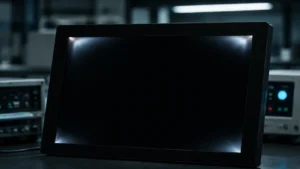
LCD screen bleed, also called LCD backlight bleed, is unwanted light leakage that appears around the edges, corners, or pressure points of an LCD when the screen displays a black or dark image.
Common causes include uneven housing pressure, poor light-blocking tape, backlight film or light guide plate misalignment, LCD frame deformation, thermal expansion, excessive screw torque, transportation shock, and touch panel, cover lens, or bonding stress.
For OEM projects, the best prevention method is to define mechanical tolerance, gasket compression, black-screen inspection conditions, Golden Sample, Limit Sample, and supplier inspection criteria before mass production.
What Is LCD Screen Bleed?
LCD screen bleed is usually related to mechanical structure, optical stack design, backlight control, and assembly process. It is not normally a software error.
How an LCD Screen Uses Backlight
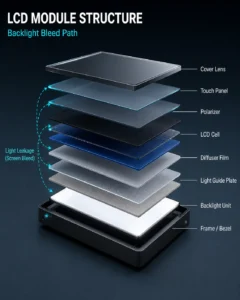
Unlike self-emissive technologies such as OLED, most transmissive Liquid-Crystal Display (LCD) modules cannot generate light by themselves. They need a bright light source behind the LCD cell and optical film stack. This light source is called the backlight unit (BLU).
The liquid crystal layers control how much light passes through each pixel. When the image is black, the LCD structure reduces transmitted backlight, but some light may still pass through the stack or escape from the edge. Therefore, backlight structure, polarizer alignment, masking tape, frame design, and final housing design all affect black-screen appearance.
What Screen Bleeding Looks Like
LCD screen bleed appears when unwanted backlight escapes from areas where it should be blocked. It often looks like uneven bright spots, cloudy patches, yellowish or whitish halos, corner light leakage, or fixed bright areas near the display edge.
The issue is most visible when the screen shows a black image in a dark room. In bright environments, minor leakage may be hard to notice. But in dark UIs, night operation panels, medical interfaces, smart home panels, or industrial monitoring systems, it can become obvious.
Why Light Leakage Appears Around the Edges
Light leakage often appears near edges or corners because many layers meet there, including LCD glass, polarizers, diffuser films, light guide plate, frame, adhesive tape, touch panel, cover lens, and outer bezel.
The edge area is also sensitive to pressure. Slight bending, uneven clamping, poor adhesive sealing, tolerance mismatch, or frame deformation may create a path for light to escape. For OEM products, display integration should not be treated only as an electrical task. Mechanical design around the LCD module is equally important. For long-term supply projects, teams can review LMTEK custom TFT display solutions during the early design stage.
LCD Screen Bleed vs. IPS Glow: Key Differences
Before rejecting samples or a production batch, engineering and quality teams should confirm whether the issue is true backlight leakage or another visual characteristic. LCD screen bleed is often confused with IPS glow.
What Is IPS Glow?
Many industrial and commercial LCD modules use In-Plane Switching (IPS) technology because IPS panels provide wide viewing angles and good color performance.
IPS panels may show a phenomenon called IPS glow. When a black image is displayed in a dark room and viewed from an off-center angle, the screen may show a soft silver, white, or amber haze, especially near the corners. In many cases, IPS glow is an optical characteristic of the panel, not a manufacturing defect.
What Is True Backlight Bleeding?
True backlight bleeding is usually related to structure, assembly, pressure, or light-blocking control. It means light escapes from a fixed physical area where it should be contained. Unlike IPS glow, true screen bleed usually stays in the same location, often along an edge, corner, or pressure point.
How Viewing Angle Helps Identify the Difference
A simple visual check can help:
- Display a full black image.
- Look directly at the glowing area.
- Move your head up, down, left, and right.
- If it is IPS glow, the intensity, shape, or location may shift.
- If it is LCD screen bleed, the bright area usually remains fixed.
LCD Screen Bleed vs. IPS Glow vs. Mura vs. Backlight Uniformity
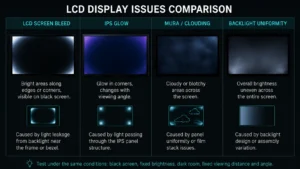
Similar display appearance issues may have different root causes and corrective actions.
| Issue | Typical Appearance | Typical Location | Changes with Viewing Angle? | Common Cause |
|---|---|---|---|---|
| LCD screen bleed / backlight bleed | Fixed bright patches, edge leakage, corner halos | Edges, corners, pressure points | Usually no | Housing pressure, masking control, assembly variation |
| IPS glow | Soft silver, white, or amber haze | Corners or dark areas | Yes | IPS optical characteristic |
| Mura / clouding | Uneven patches, stains, cloudy areas | Across active display area | Usually no | Panel stress, film variation, bonding stress, process variation |
| Backlight uniformity issue | Uneven brightness distribution | Across the full display area | No | Backlight design, LED distribution, diffuser, light guide plate |
LCD Screen Bleed
LCD screen bleed usually appears near edges or corners and is linked to mechanical pressure, masking control, light-blocking tape, frame structure, or assembly variation.
IPS Glow
IPS glow changes with viewing angle. It is related to the optical behavior of IPS panels, especially when viewed from an angle in a dark room.
Mura or Clouding
Mura or clouding appears as uneven patches across the active area. It may be caused by panel stress, polarizer issues, film variation, bonding stress, or mechanical pressure.
Backlight Uniformity Issues
Backlight uniformity refers to uneven brightness distribution across the screen. It may come from LED distribution, diffuser performance, or light guide plate design, not only from edge leakage.
Common Causes of LCD Screen Bleed
Screen bleed is often related to mechanical design, assembly pressure, optical material control, or transportation stress.
Mechanical Pressure from Bezel or Housing Design
Uneven mechanical pressure is one of the most common causes. If the plastic or metal housing is too tight, it may clamp the display module and slightly flex the LCD structure. Even small deformation can change the gap between optical layers and make light leakage visible.
Narrow-bezel or zero-bezel designs are especially sensitive because they leave less space for tolerance, gasket compression, shock absorption, and thermal expansion.
Poor Layer Alignment During Display Assembly
A display module is a stack of glass, polarizers, diffuser films, light guide plates, tapes, and frames. If a diffuser film, light-blocking tape, reflector film, or frame component shifts slightly, the optical seal may become weaker. Low-quality masking tape may also lift after heat, vibration, or long-term use.
This is why LCD suppliers need stable assembly processes, clean production environments, inspection standards, and material change control.
Temperature, Humidity, and Thermal Expansion
Industrial devices may work in hot, cold, humid, or outdoor environments. According to thermal expansion, materials such as plastic, aluminum, glass, adhesive, foam, and metal frames expand and contract at different rates.
If an LCD is tightly mounted in a rugged enclosure, high temperature may increase pressure on the display, while low temperature may change material stiffness and stress distribution. This can create temporary or permanent pressure points and visible leakage.
 For outdoor or high-brightness projects, brightness should be reviewed together with mechanical stress, bonding method, operating temperature, and sunlight readability. Related options can be reviewed under LMTEK high brightness display solutions.
Handling, Transportation, or Vibration Damage
If a display module is dropped, handled roughly, or exposed to strong vibration during shipment, internal backlight films or retaining structures may shift. Adhesive tape may also loosen or deform. Packaging design, vibration testing, and incoming inspection are important for long-distance shipment and industrial projects.
Touch Panel, Cover Lens, or Bonding Stress
Many custom displays include a capacitive touch panel, resistive touch panel, printed cover lens, optical bonding layer, frame bonding tape, or front enclosure.
If the cover lens is too heavy, adhesive thickness is uneven, the touch FPC route is stressed, or bonding introduces local pressure, the final display stack may show light leakage, mura, or other appearance issues. The LCD, touch panel, cover lens, adhesive, gasket, housing, and assembly process should be reviewed as one system.
Why LCD Screen Bleed Matters in OEM and Industrial Projects
In B2B products, display quality is connected to product value, customer trust, and long-term reliability. Visible light leakage on a professional device can affect how users judge the whole product.
Poor User Experience in Dark UI Applications
Dark backgrounds are common in smart home panels, medical devices, industrial HMIs, energy management systems, marine equipment, test instruments, and control-room dashboards. Severe screen bleeding in a dim environment can reduce comfort and make the product feel less refined.
Higher Return Rates and Customer Complaints
Backlight bleeding is a physical hardware issue and cannot be solved by firmware updates. If an OEM ships products with obvious screen bleeding, the result may include complaints, returns, rework costs, supplier disputes, or delayed schedules.
Display Quality Risks in Industrial HMI and Smart Devices
In industrial systems, display clarity supports safe and efficient operation. Strong leakage may reduce perceived contrast and make icons, alarms, or low-brightness information harder to read.
For an industrial Human-Machine Interface (HMI), display integration should include optical, mechanical, electrical, and environmental considerations. The goal is not only to turn the display on, but to make it perform consistently in the final product.
How to Test LCD Screen Bleed and Define Acceptance Criteria
A standardized test helps suppliers, engineering teams, and incoming quality teams evaluate displays fairly.
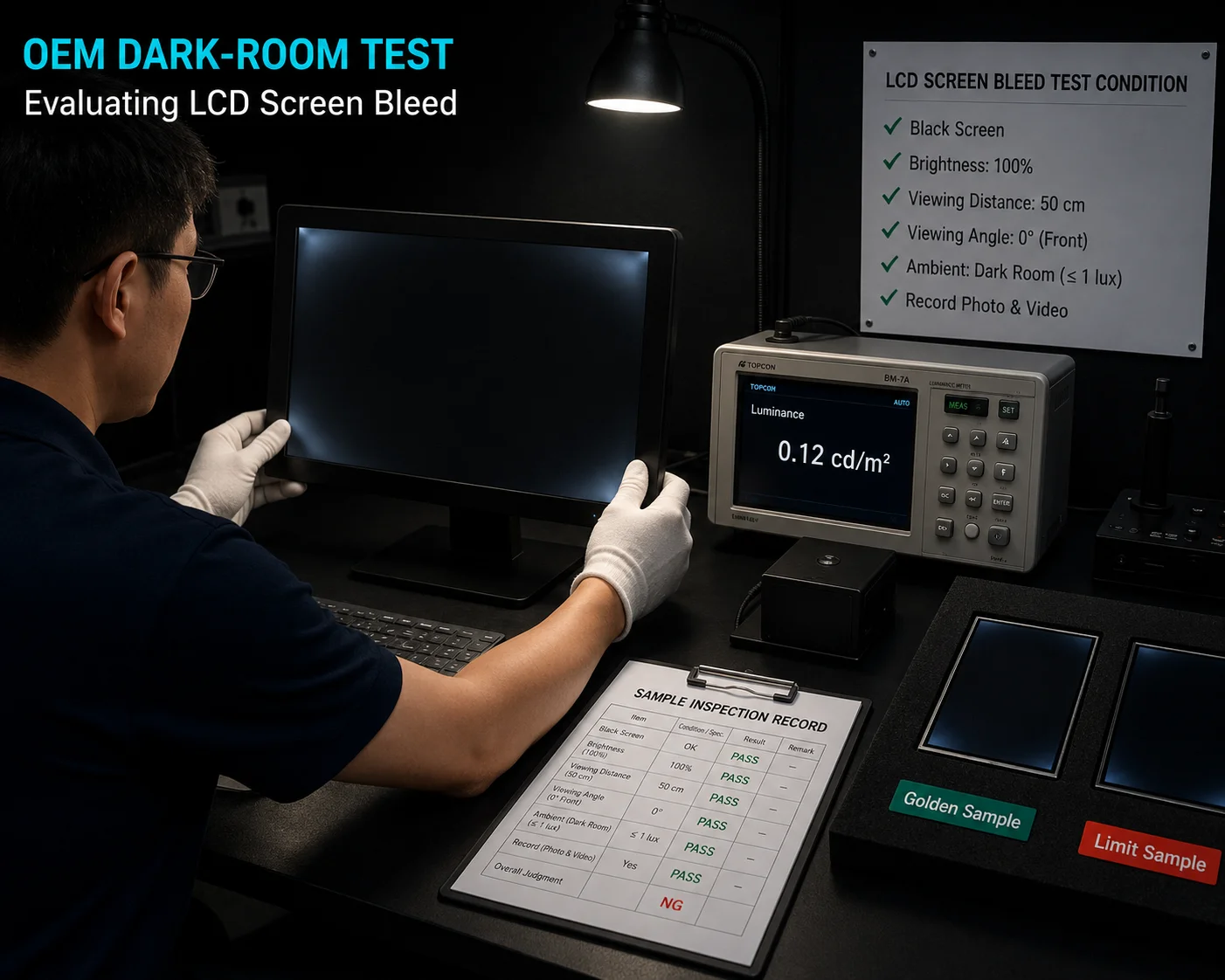
Use a Dark-Room Test with a Black Image
Screen bleeding should not be judged under bright office lighting. A basic test can follow these steps:
- Move the display into a dark room, preferably below 10 lux.
- Show a solid black image, such as RGB 0, 0, 0.
- Hide menus, cursors, status bars, and overlays.
- Keep the display on for at least 30 minutes.
- Inspect from the normal operating direction first.
- Record model, brightness, test image, ambient light, viewing distance, and viewing angle.
Set Brightness, Viewing Distance, and Viewing Angle
Consistent conditions reduce subjective judgment. Set brightness to 100% or target application brightness, use a consistent viewing distance such as 30 to 50 cm, inspect from direct front view first, then check side angles separately. Use a full black image first and add gray-level images if needed.
Record Photos and Test Conditions
Photos are useful, but camera settings must be controlled. A smartphone may automatically increase exposure in a dark room and exaggerate minor glow. For supplier communication, lock ISO, shutter speed, focus, white balance, and distance, and record the display brightness, room lighting, test image, and viewing distance.
Define Acceptable Light Leakage Criteria
Completely eliminating visible light leakage can be difficult in many edge-lit LCD designs, especially under full-black images in a dark room at high brightness. OEM buyers should define acceptance criteria before mass production.
A practical method is to approve a physical Golden Sample and Limit Sample. The Golden Sample shows the preferred appearance. The Limit Sample shows the maximum acceptable screen bleed. Both customer and supplier should approve them before mass production.
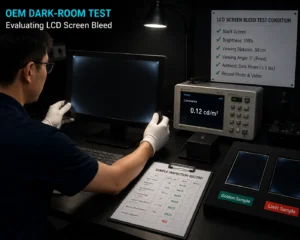
Suggested OEM Test Conditions
| Test Item | Recommended Condition |
|---|---|
| Test image | Full black image, RGB 0, 0, 0 |
| Warm-up time | At least 30 minutes |
| Ambient light | Dark room, preferably below 10 lux |
| Brightness | 100% or target application brightness |
| Viewing distance | 30 to 50 cm |
| Viewing angle | Front view first, then side-angle check |
| Photo record | Fixed ISO, shutter speed, focus, white balance, and distance |
| Acceptance method | Golden Sample, Limit Sample, and written criteria |
When Should a Display Be Reviewed or Rejected?
A display should be reviewed if leakage is clearly visible under agreed conditions, exceeds the approved Limit Sample, affects dark UI readability, appears after final assembly, stays fixed near a pressure point, becomes worse after thermal cycling or vibration, or shows large batch variation.
Can LCD Screen Bleed Be Fixed?
LCD screen bleed can sometimes be reduced if caused by external housing pressure. It usually cannot be fully repaired if the root cause is inside the LCD module, backlight structure, or optical stack.
When Minor Pressure-Related Bleed May Be Reduced
If a housing presses too tightly on the display, mechanical adjustment may help. Loosening screws slightly, adjusting the gasket, changing foam compression, or improving pressure distribution may reduce stress. Any rework should follow an approved engineering process.
Why DIY Fixes Are Not Suitable for Batch Projects
Some consumer forums suggest massaging the screen edge. This is not suitable for OEM batch projects because it can damage TFT pixels, polarizers, touch sensors, cover glass, or bonding layers. It also does not solve the root cause.
When Replacement, Rework, or Supplier Review Is Needed
If mechanical adjustment does not help, the defect may come from internal tape failure, frame deformation, optical film shift, poor masking, or backlight assembly variation. The batch should be reviewed with the supplier, and repeated issues should trigger Corrective and Preventive Action.
How to Prevent LCD Screen Bleed in OEM Display Design
Prevention is cheaper than field rework. OEM teams can reduce risk through mechanical design, material selection, assembly control, inspection standards, and supplier communication.
Leave Proper Mechanical Tolerance Around the LCD
The product housing should not clamp heavily on the LCD active area or fragile glass edge. A safety gap is usually needed between the display module and the hard plastic or metal enclosure.
In compact designs, engineers may reserve a small clearance, for example around 0.2 mm to 0.4 mm. The final value should depend on module size, housing material, gasket compression, tolerance stack-up, impact protection, sealing requirements, and environmental testing.
Use Soft Gaskets, Foam Tapes, or Cushioning Materials
Soft materials such as Poron foam, VHB tape, silicone gasket, or die-cut cushioning materials can protect the display while maintaining sealing performance. If the gasket is too hard, too thick, or placed incorrectly, it may still create pressure marks or light leakage.
Consider Optical Bonding Based on Project Requirements
In a standard display structure, there may be an air gap between the LCD panel and the outer cover lens or touch panel. Optical bonding uses optical-grade adhesive or film to bond layers together. It can reduce internal reflection, improve sunlight readability, and increase front-stack rigidity.
In rugged, outdoor, or high-vibration designs, optical bonding may reduce some stress-related risks. However, it is not a universal fix for screen bleed, and poor bonding control may introduce mura, stress marks, bubbles, or brightness variation. For custom cover lens, touch panel, or bonding requirements, OEM teams can review LMTEK custom touch screen solutions early.
Control Assembly Pressure and Cleanliness
Final assembly should use proper screw torque, balanced pressure, and stable fixtures. Overtightening one screw near a corner can bend the frame and create leakage. Dust, particles, adhesive residue, or foreign materials near optical layers may also affect appearance.
Validate the Final Product Structure, Not Only the Bare LCD Module
A bare LCD module may pass supplier inspection, but screen bleed may appear after final assembly. OEM teams should test the display inside the actual product structure during prototype and pilot production, including final housing, touch stack, gasket, screw torque, cable routing, operating temperature, vibration simulation, and black-screen inspection.
What OEM Buyers Should Confirm with Display Suppliers
A good display supplier should support both technical selection and quality control. Requirements should be confirmed before mass production.
Backlight Uniformity and Inspection Method
Do not only check brightness specifications such as 500 nits or 1000 nits. Ask about backlight uniformity, black-screen inspection, dark-room conditions, and acceptable light leakage standards.
Useful questions include: What is the minimum luminance uniformity requirement? How is black-screen leakage inspected? What brightness, viewing distance, and viewing angle are used? Are Golden Sample and Limit Sample used? How are photos controlled? How are appearance defects classified?
Sample Approval and Mass Production Criteria
Before mass production, OEM buyers should approve both Golden Sample and Limit Sample. These samples should be physically signed and documented. During production, the supplier’s QA team should compare batch output against these references to reduce subjective judgment and disputes.
Touch Panel, Cover Lens, and Bonding Requirements
If the product requires a custom touch panel, thick cover lens, printed cover glass, optical bonding, frame bonding, or special gasket design, discuss these details early. The LCD module, touch panel, cover lens, adhesive, housing, and assembly process should be designed as one system.
PCN and Material Change Control
Display appearance can change when key materials are changed, including LCD cell, backlight LEDs, light guide plate, diffuser films, reflector film, polarizer, masking tape, frame material, adhesive, touch sensor, cover lens, or bonding material.
OEM buyers should confirm how suppliers manage material changes and Product Change Notification (PCN). For long-lifecycle industrial projects, stable material control is important for consistent optical performance.
OEM Buyer Checklist Before Mass Production
Before approving mass production, confirm backlight uniformity, black-screen inspection method, acceptable leakage criteria, Golden Sample, Limit Sample, mechanical tolerance, cover lens and bonding method, gasket compression, screw torque, packaging protection, thermal cycling plan, PCN control, incoming inspection, and supplier corrective action process.
How LMTEK Can Support Display Evaluation
Through display and embedded hardware integration experience, LMTEK supports OEM teams in reviewing display selection, touch panel structure, housing tolerance, bonding method, backlight brightness, and long-term supply requirements.
For industrial and embedded projects, LMTEK can help customers evaluate TFT display module selection, touch panel and cover lens design, optical bonding, backlight brightness and uniformity, housing tolerance, interface matching, sample approval, mass production control, lifecycle supply planning, and product change communication.
You can also explore more related solutions:
- TFT Display Modules
- Custom TFT Display Solutions
- Custom Touch Screen Solutions
- High Brightness Display Solutions
- Industrial HMI Solutions
FAQ About LCD Screen Bleed
Is a Little Bit of LCD Screen Bleed Normal?
A slight amount of light leakage may appear on some edge-lit LCD designs under full-black images in a dark room at high brightness. For OEM projects, the key is whether it meets the approved criteria and real application environment.
What Is the Difference Between LCD Screen Bleed and Backlight Bleed?
In most practical discussions, both terms mean unwanted backlight leakage visible around the edges, corners, or pressure points of an LCD module.
Does LCD Screen Bleed Get Worse Over Time?
It often remains stable, but it may change after thermal cycling, housing deformation, adhesive aging, vibration, or long-term mechanical stress.
Do OLED Screens Have Backlight Bleed?
No. OLED displays are self-emissive and do not use a backlight unit, so they do not suffer from LCD-style backlight bleed. OLED still has other design considerations, including cost, lifetime, burn-in risk, and brightness limitations.
Will Screen Bleed Affect Display Lifespan?
LCD screen bleed is usually a visual issue, but if it is caused by strong mechanical stress, the same stress may affect touch performance, bonding reliability, glass stability, or long-term mechanical reliability.
Is Optical Bonding Always Necessary?
No. Indoor applications with controlled lighting, moderate brightness, and good housing design may use standard air bonding or frame bonding. Optical bonding is more common for outdoor, high-brightness, rugged, or high-vibration applications.
How Should OEM Buyers Judge Acceptable Screen Bleed?
Judge it based on the final application. A bright factory device may allow minor edge leakage, while a dark-room panel, night operation device, or premium smart product may require stricter black-screen criteria.
What Is the Difference Between Screen Bleed and Mura?
Screen bleed usually appears near edges or corners and is related to light leakage, pressure, or masking control. Mura appears as clouding, stains, or brightness variation across the active area.
Can Housing Design Cause LCD Screen Bleed?
Yes. A tight bezel, hard gasket, high screw torque, or uneven enclosure pressure can create bright patches or edge leakage.
What Information Should I Provide to a Display Supplier?
Provide display size, resolution, interface, brightness, touch and cover lens structure, housing drawing, opening size, gasket design, temperature range, application environment, black-screen requirement, approval criteria, and controlled photos or videos.
Conclusion
LCD screen bleed is a common but often misunderstood display appearance issue. For consumer products, minor light leakage may be acceptable. For OEM and industrial projects, visible screen bleeding can affect user experience, perceived quality, customer satisfaction, and product reliability perception.
The best solution is not after-sales repair. OEM teams should control the risk from the beginning through LCD selection, mechanical tolerance design, gasket selection, optical bonding evaluation, assembly pressure control, and supplier inspection standards.
By defining clear acceptance criteria, using Golden Sample and Limit Sample, and working with an experienced display supplier, OEM teams can reduce display integration risks and build a more stable long-lifecycle product.
If you need support for custom TFT displays, touch panels, optical bonding, high-brightness LCD modules, or industrial HMI integration, LMTEK can help your team evaluate the right display solution from prototype to mass production.